Lynx PMS: Setup Think Reservations Integration
What You Do:
The Lynx Customer Success team will provide the tokens to the customer. You will need to sync each unit to Lynx. The steps to follow are below.
The Process:
| Actions |
Who Does It |
Timeline |
|
Request Access from Lynx
|
Lynx Customer Success team |
1-2 Business days |
|
Next steps: Add tokens to the Think Reservations.
|
Customer or Think Reservations Support |
When Ready |
On Lynx Platform:
|
Step 1:
|
- Setup your Lynx account
- Reach out to customer success Manager to request for the Token Key and Token Secret
- Once you have the Token Key and Token Secret follow the steps on the Think platform to connect Think with Lynx
|
OnThink Platform:
| Step 1 : |
- Navigate to Settings > Marketplace
-
Find the Lynx application and click on Learn More.
If you don't already have an account with Lynx, you'll find details on this page about Lynx and how to reach out to Lynx to get started.
Don't continue on to the next steps until you've your Lynx Account setup.
|
| Step 2: |
- Click the "Add Application" button on the top left
-
You will be taken to the Lynx settings page, which you can navigate to at any time by clicking on Lynx on the left side navigation in your settings menu
|
| Step 3: |
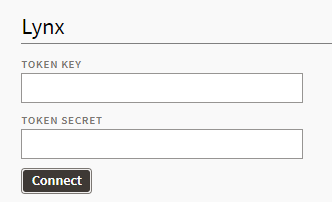
- Input your Lynx "Token Key" and "Token Secret" then click Connect. (the Token Key and Token Secret must be obtained from the Lynx Customer Success team).
|
| Step 4: |
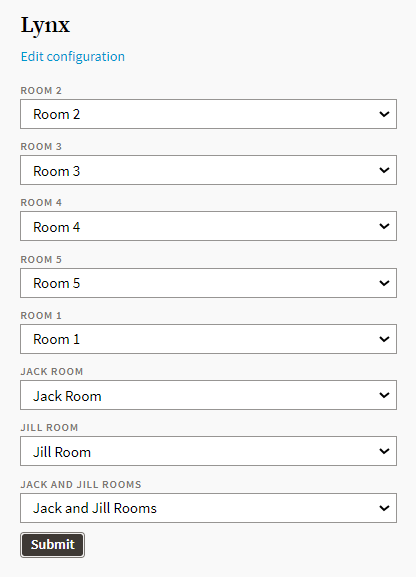
- You will now see the Lynx room mapping page like the one below. Use this form to complete the mapping of rooms in ThinkReservations to "properties" in Lynx.
|
| Step 5 : |
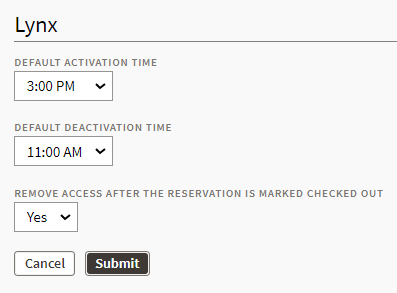
- Next, click Edit Configuration to access additional settings as shown below. Here, you will set the default activation and deactivation time for codes, as well as whether or not codes should deactivate as soon as the reservation is checked out (if that time is earlier than the default deactivation time.
|
Follow the steps here to the Lynx<>think Reservations setup on the PMS Platform: https://help.thinkreservations.com/en/articles/8568705-getting-started-with-lynx

Comments
0 comments
Article is closed for comments.